

Trading Journal App: 5 Features That Replace Your Spreadsheet
The right trading journal app auto-imports trades, tags emotions, and reviews your week with AI. Here's what to look for and why spreadsheets fall short.
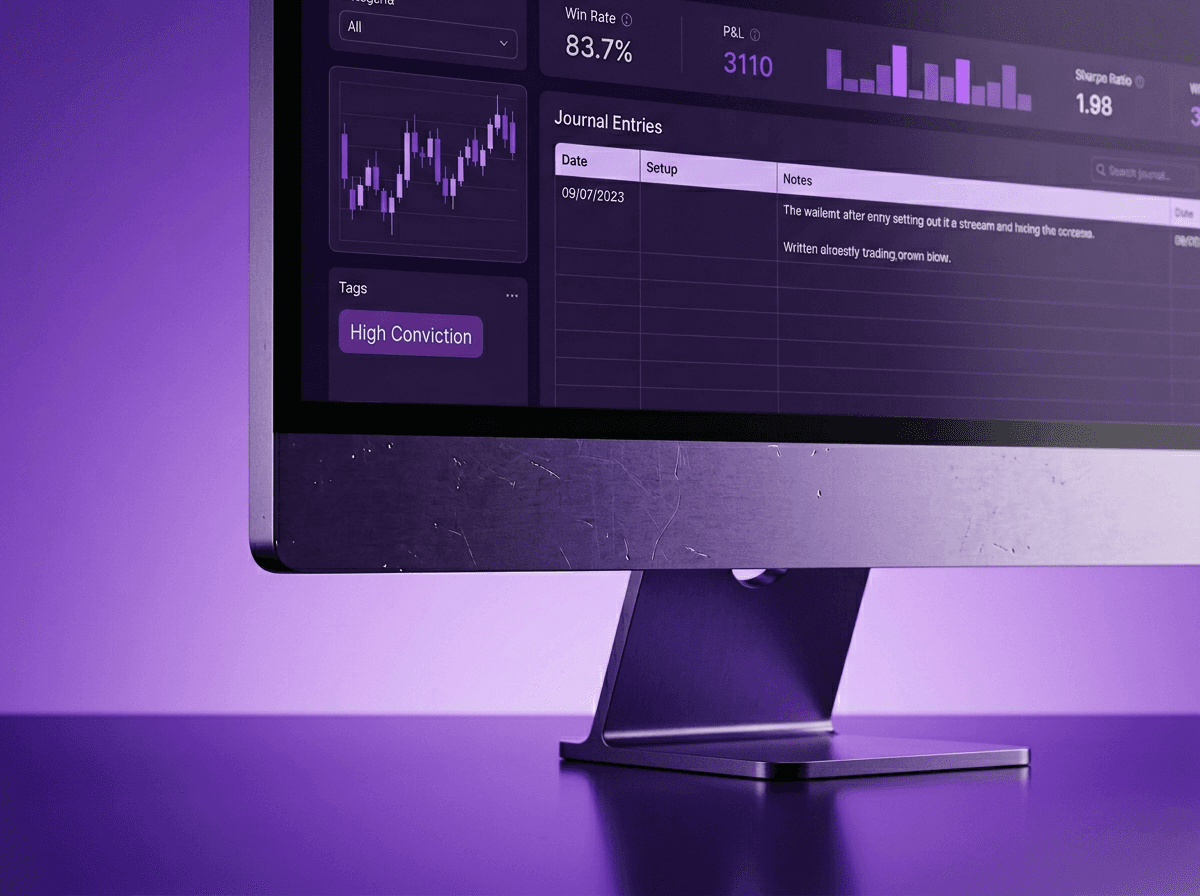
A good trading journal app does three things your spreadsheet never will: it pulls trades in automatically, captures how you felt during each one, and tells you what patterns you keep repeating. That last part is what actually changes your trading.
Most traders know they should journal. Very few do it consistently. The gap between knowing and doing almost always comes down to friction. If the tool makes journaling harder than it needs to be, you skip days. Skip enough days, and you lose the feedback loop that makes journaling worthwhile in the first place.
This article breaks down what separates a useful trading journal app from another tab you never open. Every feature here ties back to one question: does this actually help you review and improve, or is it just more data entry?
TL;DR
Notebooks and spreadsheets fail because manual entry creates friction that kills the journaling habit.
Auto-import from your broker eliminates the biggest reason traders stop journaling.
Emotion tagging at the moment you close a trade captures data you can't reconstruct later.
Voice reflection after trades gives you raw, honest insight that typed notes miss.
A weekly AI report surfaces behavioral patterns you'd never spot reading your own entries.
Why Notebooks and Spreadsheets Fail
Here's the usual pattern. You decide to start journaling your trades. You set up a notebook or build a spreadsheet with columns for entry price, exit price, lot size, R-multiple, and notes. The first week goes fine. By week three, you're logging trades two days late from memory. By month two, the spreadsheet sits untouched.
This isn't a discipline problem. It's a friction problem.
A physical notebook can't calculate your win rate or average R-multiple. A spreadsheet can, but only if you enter every field correctly every single time. Miss one decimal, transpose two numbers, and your stats lie to you. Worse, you're doing data entry when you should be thinking about what happened in the trade.
Brad Goh, who built EdgeFlo after seven years of live trading, described exactly this situation: he was juggling six different apps and spreadsheets just to stay disciplined. The journaling part was the first thing that slipped because it demanded the most manual effort for the least immediate payoff.
Example: The spreadsheet that lied. A beginner trader tracks 40 trades across a month in Google Sheets. They enter every trade manually at the end of each day. Three weeks in, they notice their win rate says 62%. Feeling confident, they increase position sizes. Then during a proper review process, they find four trades were logged with the wrong lot sizes and two exits were recorded at the wrong price. Real win rate: 48%. The confidence was built on bad data.
The problem isn't the trader's effort. It's asking a human to do a machine's job. Trade logging should happen automatically. Your energy should go toward the part machines can't do: reflecting on why you took the trade and what you were feeling when you did.
If you've tried journaling in a notebook and quit, that's normal. The format fights the habit. A dedicated trading journal app removes the friction that killed it.
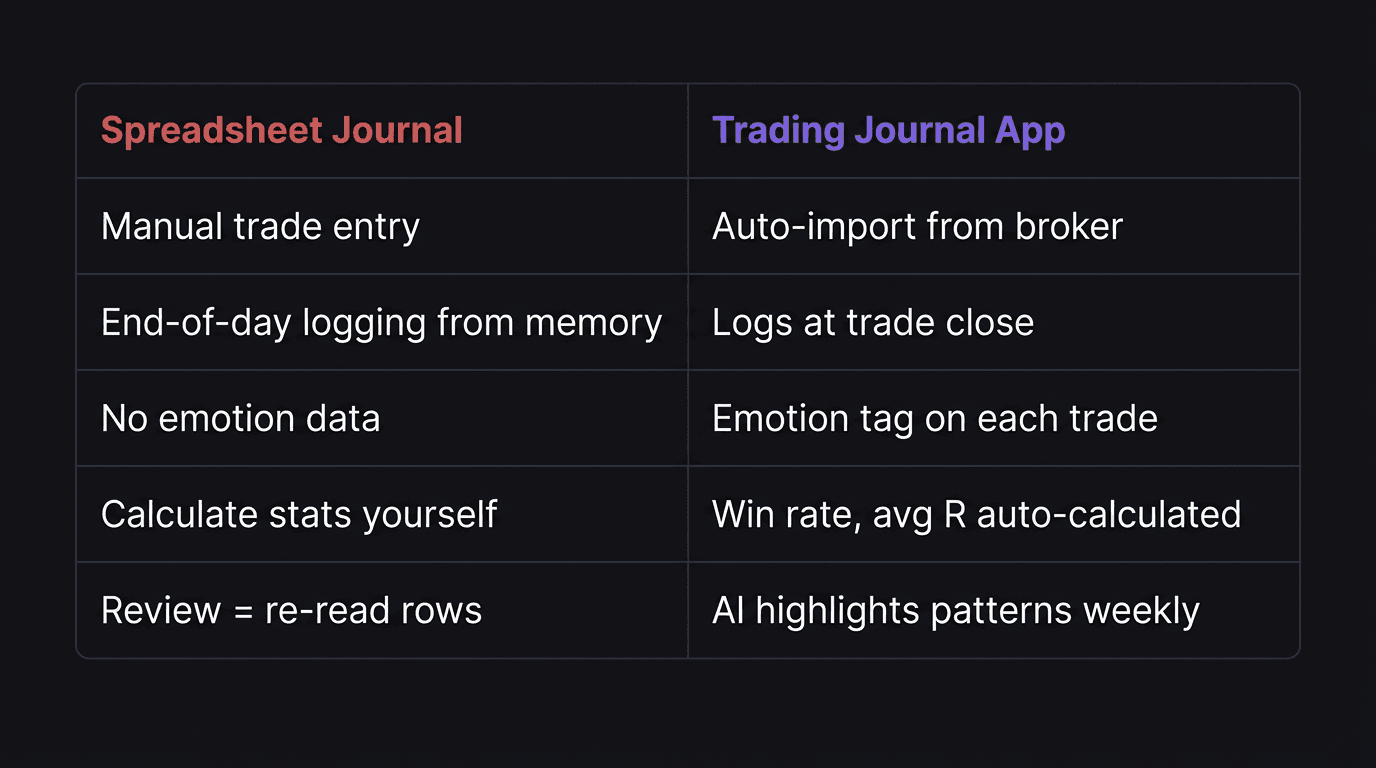
Features That Actually Help You Review
Not every feature in a trading journal app matters equally. Some are nice-to-have. A few are deal-breakers. Here's how to tell the difference.
The features that matter most are the ones that feed your trade review habit. If a feature doesn't help you spot patterns, change behavior, or reduce friction, it's decoration.
Emotion Tagging
This is the single most underrated feature in a trade journal. Most apps let you record price, lot size, and outcome. Very few ask you how you felt.
That matters because your P&L doesn't tell you why you took the trade. You could have a winning trade that was a terrible decision, entered out of FOMO on a setup that didn't match your plan. Without emotion data, that trade looks great in your stats. With emotion data, you see the pattern: every time you feel anxious about missing a move, you enter early and break your rules.
The best time to capture emotion is right when you close the trade. Not at the end of the day. Not during your weekend review. Right then, while the feeling is still raw and accurate.
R-Multiple Display
Your journal should show your R-multiple on every trade, not just dollars gained or lost. Dollars are misleading because they change with position size. R-multiples normalize your results against the risk you took.
If you risked $100 and made $300, that's a 3R trade. If you risked $500 and made $300, that's a 0.6R trade. Same dollar gain, completely different quality of execution. A good journal template builds this in by default.
Performance Dashboards
A journal app should surface your key stats without you having to build pivot tables. Win rate, average R, profit factor, and performance by session or pair should be visible at a glance. This data feeds directly into your trading dashboard and makes your weekly review something you can actually act on.
AI-Powered Review
This is where journal apps are starting to separate from everything else. An AI report reads your journal entries across a week or month, then highlights patterns you'd never spot yourself.
Maybe you lose money every Monday. Maybe your worst trades happen when you log "frustrated" as your entry emotion. Maybe your win rate on GBP/USD is 38% but your win rate on EUR/USD is 61%, and you're still trading GBP/USD five times a week.
A human reading their own journal tends to remember what they want to remember. AI doesn't have that bias. It just reads the data and tells you what's there.
Auto-Import Kills Friction
If you have to manually type your entry price, exit price, lot size, and pair after every single trade, you will eventually stop. That is not a prediction. It's what happens to almost every trader who journals manually.
Auto-import solves this by pulling your trade data directly from your broker. You close a trade on cTrader/ TradeLocker. The data appears in your journal. No typing. No copy-pasting. No end-of-day data entry sessions where you're trying to remember what happened at 9:47 AM.
This does two things. First, it makes the data accurate. No more transposed numbers or forgotten trades. Second, it frees your mental energy for the part that actually matters: writing down what you were thinking and why you made the decisions you made.
Example: The voice note vs. the blank cell. A forex trader closes a losing GBP/USD trade at London open. With a manual spreadsheet, they'd need to enter the pair, the entry at 1.3100, the exit at 1.3065, the lot size of 0.5 (which is $5 per pip on a standard account, so 35 pips times $5 equals $175 loss), the R-multiple, and a note about what happened. With auto-import, the numbers are already there. They tap the emotion tag ("frustrated"), hit the voice button, and say: "I entered early. I saw the candle breaking below support and panicked into a sell before my confirmation showed up. The setup was valid but my timing was off because I was scared of missing it." That 15-second voice note is worth more than any spreadsheet row.
When evaluating a journal app, check whether it connects to your actual broker, not just whether it has a "trade log" screen. The connection is what eliminates friction. Without it, you're back to manual entry with a prettier interface.
Voice Reflection After Every Trade
Typing a trade reflection feels like homework. Speaking one feels like venting to a friend.
That difference matters more than it sounds. When you type, you edit yourself. You clean up your thoughts. You write what sounds reasonable instead of what you actually felt. When you speak right after closing a trade, you get the raw version. The version that says "I knew I shouldn't have taken that trade but I did it anyway because I was down on the day and wanted to get back to breakeven."
That raw honesty is where your post-trade review becomes useful. You can't fix patterns you won't admit to. Voice reflection catches the admissions that typed notes filter out.
A good trading journal app transcribes your voice note and stores it alongside the trade data. During your weekly review, you can read through these transcriptions and spot the emotional patterns that keep showing up. Maybe "I wanted to get back to breakeven" appears in five separate entries across a month. That's a revenge-trading pattern, and you might never have written it down in a typed note.
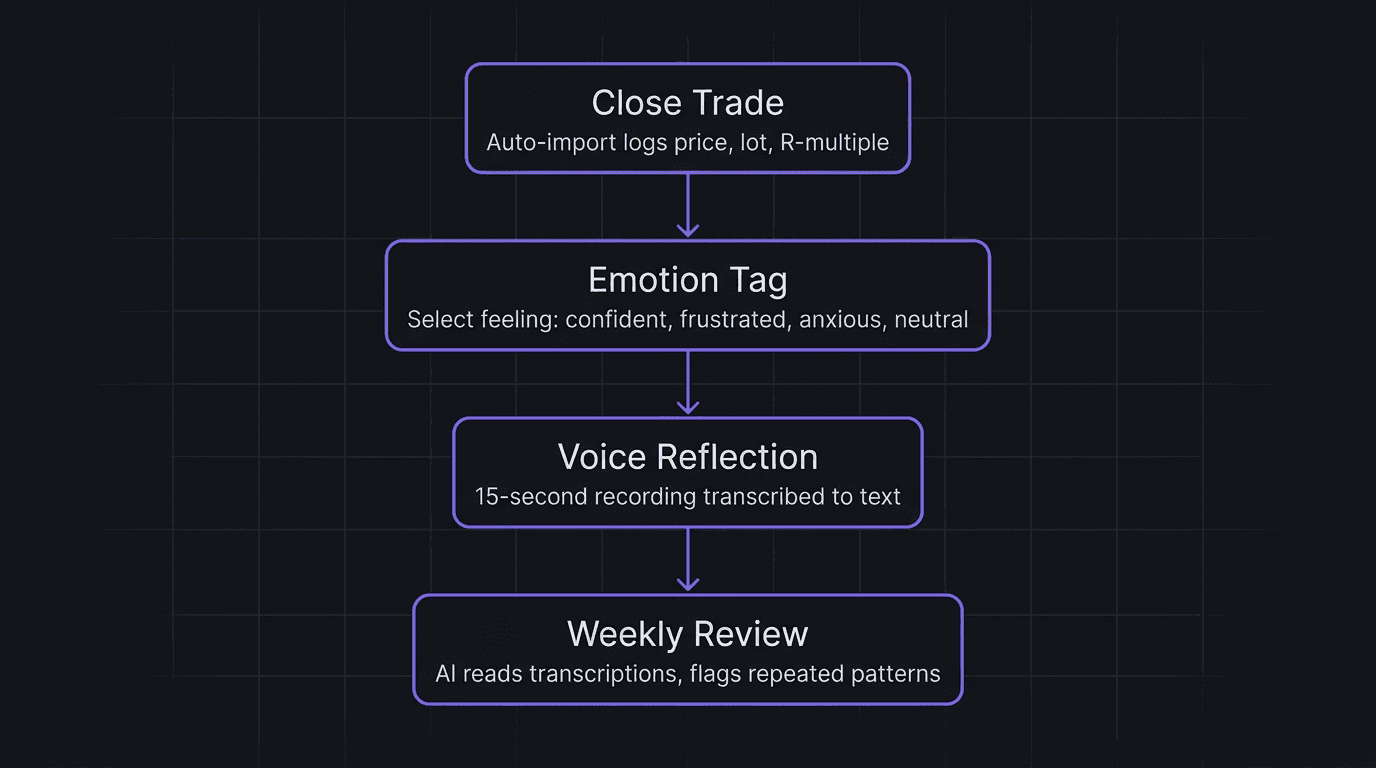
The traders who improve fastest aren't the ones who take the most trades. They're the ones who review the most honestly. Voice reflection is the lowest-friction path to honest review.
How EdgeFlo Handles Your Entire Journal
EdgeFlo's journal connects directly to cTrader/ TradeLocker, so every trade you take auto-imports with full data: pair, entry, exit, lot size, and R-multiple. No manual entry. No end-of-day catch-up.
When you close a trade, EdgeFlo asks how you feel right then. You pick an emotion tag and, if you want, record a voice reflection that gets transcribed and stored with that trade. During your weekly review, all of that data sits in one place: the chart screenshots, the emotion tags, the voice transcriptions, and your stats for the week.
The weekly AI report is a Plus-only feature through FloAI v1. It reads your journal entries for the week, analyzes the emotions you tagged, the mistakes you noted, and the patterns in your results, then generates a summary of what went right, what went wrong, and what to focus on next week. It's the review session most traders never do on their own, done automatically from data you already captured.
The Edge Brief
Receive Insights on trading psychology, discipline, and the behavioral patterns that create consistent traders from our Founder and the EdgeFlo team, delivered to your inbox.
Think different. Trade different.
What is the best trading journal app for beginners?
Can a trading journal app replace a spreadsheet?
Do trading journal apps have AI features?
How often should I journal my trades?

Turn discipline on.
Every session.
EdgeFlo is the environment serious traders operate inside.
Start 7-Day Free Trial
Cancel anytime.
No long-term commitment.
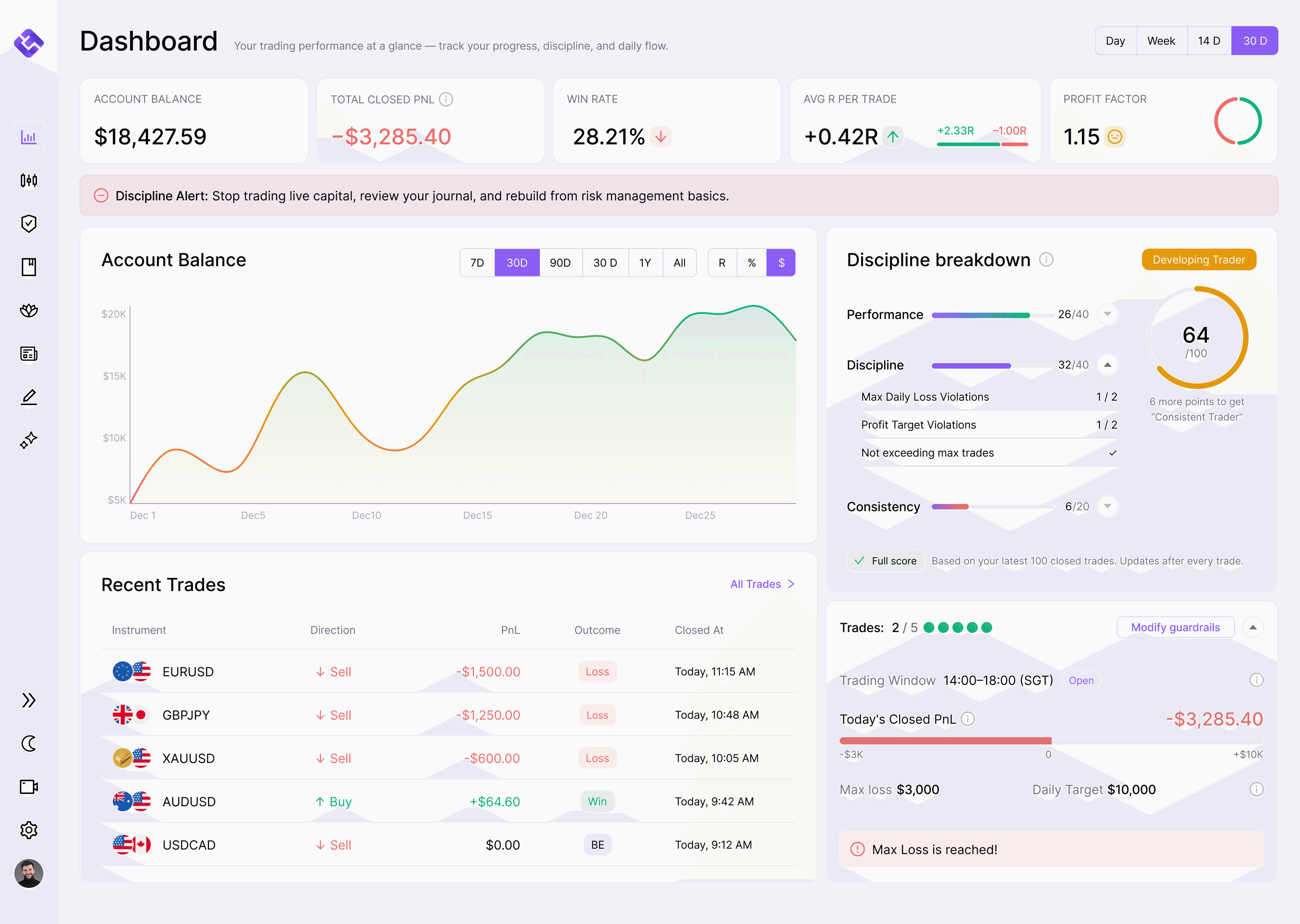

Think Different, Trade Different.