

Everything you need to trade like a professional.
Choose your plan wisely. Cancel anytime.
If EdgeFlo saves you from one big loss, it pays for itself.
Compare plans in detail.
Feature-by-feature breakdown so you know exactly what you get.
General Features
All-in-one Trading OS
Everything (dashboard, execution, journal, routines, news) lives in one workflow so you stop tool hopping.
✓
✓
Multi-Broker Compatibility
Connect via TradeLocker or cTrader to sync trades and power analytics.
✓
✓
Multi-Asset Support
Trade and track multiple asset classes inside EdgeFlo.
Platform Access
Desktop web app only for now (laptop recommended). Mobile app coming later.
✓
✓
Secure Data
Your trades, stats, and journal entries are stored securely so nothing gets lost.
✓
✓
Auto Trade Logging
Trades are automatically imported so your dashboard and journal stay up to date.
✓
✓
Guardrail Enforcement
If you violate your rules, EdgeFlo can block trading. Overrides are logged as rule breaks.
✓
✓
Pre-Market Routine
A daily checklist to set bias, mark levels, and confirm your plan before you trade.
✓
✓
Academy
Step-by-step trading education and platform guides to help you become profitable and stay consistent.
✓
✓
Customer Support
Fast in-app support to help you get set up, fix issues, and stay unblocked when you're trading.
Regular
Priority
Dashboard
Key Performance Metrics
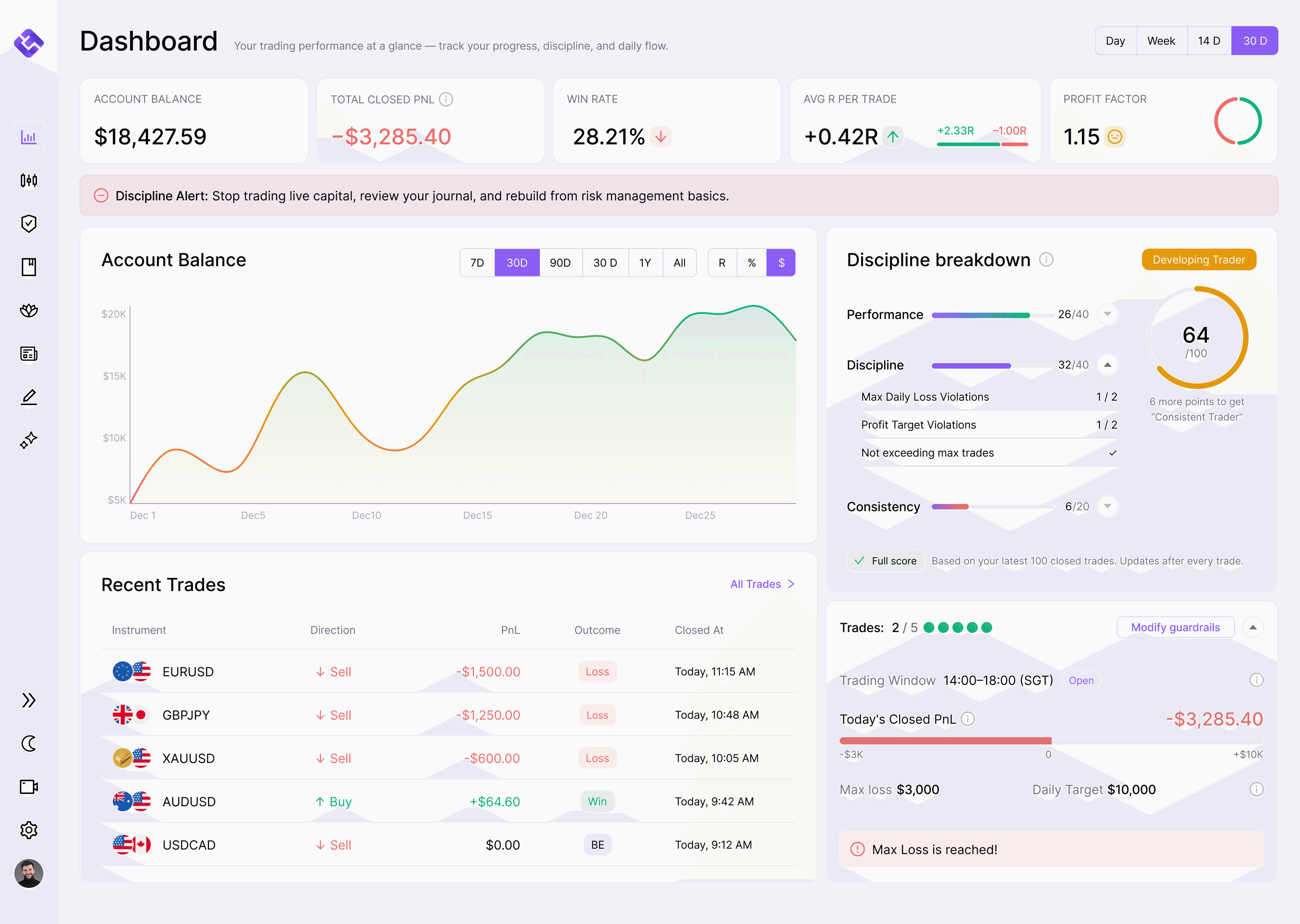
Real-time win rate, avg R, profit factor, and PnL (R/%/$) so you see the full picture fast.
✓
✓
Account Equity Curve
A clean equity curve that shows if you're growing steadily or drifting.
✓
✓
Global Filters
Filter everything by timeframe (Day/Week/14D/30D) and PnL view (R/%/$).
✓
✓
Discipline Summary (Today)
Live view of trades taken, remaining trades, max loss/profit target, and window violations.
✓
✓
Recent Trades Preview
Quick glance at your latest trades with one click into the full journal entry.
✓
✓
Session Performance
Break down results by session (London/NY) to expose where you actually perform best.
✓
✓
EdgeScore
A single score for trading quality based on performance, discipline, and consistency.
✓
✓
Smart Trading Platform
Broker Connection (TradeLocker/ cTrader)
Connect your broker so EdgeFlo can sync trades and enforce discipline at execution level.
✓
✓
Always-On Risk Calculator
Auto-calculates position size and shows risk in $ and R before you place the trade.
✓
✓
Auto-Split Orders
Execute large positions in one click by splitting into multiple orders automatically when brokers have lot limits.
✓
✓
Trade Guard
Hard guardrails that block trades when you breach your rules (max loss, max trades, trading window, risk cap, profit target).
✓
✓
Pre-Market Routine
Complete your checklist before trading, with optional trade blocking until it's done.
✓
✓
Price Alerts
Set level alerts to stay patient and react to price, not impulses.
✓
✓
One-Click Trading
Fast execution with pre-set defaults, while still respecting guardrails and risk checks.
✓
✓
Trade Plan Beside Chart
Keep your plan visible next to the chart so you confirm rules before you execute.
✓
✓
Position Management (Close + Partial)
Close full or partial positions fast, with execution still tracked cleanly for journaling and analytics.
✓
✓
Trading Journal
AI Weekly Report
A weekly breakdown of what worked, what didn't, discipline issues, emotional patterns, and one focus for next week.
✕
✓
Auto-Import Trades
Trades sync in automatically from your connected broker so your journal is always complete.
✓
✓
Manual Trade Entry
Add trades manually anytime for backfilling or trades placed outside EdgeFlo.
✓
✓
Daily + Weekly + Monthly Overview
Calendar-style view that shows your stats and consistency patterns at a glance.
✓
✓
Emotion Tagging
Tag how you felt at entry and exit so you can spot the psychology behind your results.
✓
✓
Voice Journaling
Speak your reflections instead of typing so journaling stays fast and honest.
✓
✓
AI Reflection Prompts
AI asks smart post-trade questions so you review the right things, not just the outcome.
✓
✓
Data Integrity
Raw trade data stays untouched. AI only adds interpretation so you can trust the journal.
✓
✓
Economic News & Calendar
News Trade Blocking
Automatically blocks trading around high-impact events to prevent impulsive news trades.
✕
✓
Upcoming Events
See today's and this week's market-moving events in one clean list.
✓
✓
Watchlist Filtering
Events auto-filter based on what you trade so you don't get flooded with irrelevant news.
✓
✓
Impact Levels
Clear impact ratings so you instantly know what to respect.
✓
✓
List View
Fast scan view with time, currency, event name, impact, and key numbers.
✓
✓
Calendar View
Monthly planning view so you can see event-heavy days ahead of time.
✓
✓
Event Details
Open any event to view actual/forecast/previous plus extra context.
✓
✓
Bookmarks
Save important events and view them anytime with one toggle.
✓
✓
Filters That Persist
Your filters stay saved so you don't have to reconfigure every session.
✓
✓
Notebook
Fast Notes
Create notes instantly with a clean editor that stays out of your way.
✓
✓
Templates Library
Start from proven templates so you never face a blank page.
✓
✓
Template Preview + Use
Preview any template, then duplicate it into a new editable note in one click.
✓
✓
Auto-Save
Notes save automatically as you type so you never lose thoughts.
✓
✓
Pinned Notes
Pin important notes so they always stay at the top.
✓
✓
Folders
Organize notes into folders so your ideas stay clean and searchable.
✓
✓
Emojis + Color Tags
Add emojis and color tags to notes and folders for quick visual organization.
✓
✓
Notes List Preview
Scan titles, previews, and last edited time without opening each note.
✓
✓
Search
Search across note titles and content to find anything instantly.
✓
✓
Edge Trade Plan Builder
Build a Trading Plan
Build a clear trading plan with rules, criteria, and management so you stop guessing mid-trade.
✓
✓
Plan Stats
Tracks win rate, net PnL, trades taken, and compliance for every plan so you know what actually works.
✕
✓
Preset Trade Plans
Start fast with ready-made plans from Brad, Jason, or Sanjeev, then duplicate and customize.
✓
✓
Charting Checklist
A step-by-step chart prep checklist so your analysis process stays consistent.
✓
✓
Entry Models
Add screenshots and examples so you know exactly what a valid setup looks like.
✓
✓
Entry Criteria Checklist
Turn your entry rules into a checklist so "plan followed" is measurable, not vibes.
✓
✓
Risk Controls Reference
Your guardrails show inside the plan so risk is always in your decision frame.
✓
✓
Trade Management Rules
Define exits, partials, trailing, and management logic so you don't freestyle under pressure.
✓
✓
Strategy Notes
Write why it works, common mistakes, and reminders so your plan stays sharp.
✓
✓
Active Plan Mode
Set one plan as Active and it follows you everywhere during trading, journaling, and routines.
✓
✓
Sanctuary
Meditation Timer
A distraction-free timer built for traders to reset before, during, or after a session.
✓
✓
Ambient Sounds
Pick calming sounds (or silence) to regulate your nervous system and reduce tilt.
✓
✓
Streak Tracker
Track streaks, total minutes, and sessions so discipline becomes consistent, not optional.
✓
✓
Mental Toolkit
A library of guided reset, rewire, and recovery tools to stop revenge trading and rebuild control.
✓
✓
Quick Reset
Short exercises for mid-session tilt so you return to neutral fast.
✓
✓
Rewire Sessions
Deeper mindset work to break emotional patterns and build long-term discipline.
✓
✓
Recovery Rituals
End-of-day wind downs so you don't carry emotions into the next session.
✓
✓
Session Logging
Every completed session is logged automatically so progress is measurable.
✓
✓
Post-Session Check-In
Optional mood + reflection after each session to lock in awareness and accountability.
✓
✓
Intention Setting
Set a simple intention before you start so your session has a clear purpose.
✓
✓
FloAI v1 (Beta)
Guidance-First AI Coach
A calm AI coach inside EdgeFlo that helps you stay grounded and disciplined when you feel stuck.
✕
✓
Trading Questions (No Data Access)
Explains concepts and frameworks clearly using your system, without signals or predictions.
✕
✓
Psychology Support
Helps you reset after losses, reduce tilt, and avoid revenge trading with simple protocols.
✕
✓
Routine Guidance
Supports your pre-market routine, in-session discipline, and end-of-day review flow.
✕
✓
FAQ
Everything you need to know
Why does EdgeFlo require a card for the free trial?
What’s the difference between Basic and Plus?
Is EdgeFlo a mobile app?
Does EdgeFlo give trade signals or trade recommendations?
Does FloAI have access to my live trades or performance data?
What does “News Trade Blocking” mean?
Can I cancel anytime?
Can I upgrade from Basic to Plus later?
What kind of support do I get?

Think Different, Trade Different.