

What TradeLocker Traders Are Missing: The Discipline Layer EdgeFlo Adds to Your Execution

What TradeLocker Traders Are Missing: The Discipline Layer EdgeFlo Adds to Your Execution
If you trade on TradeLocker, you already have fast execution. What you probably don't have is anything stopping you from overtrading after a loss, sizing too big when emotions spike, or skipping your review because logging trades manually is a chore.
That's the gap EdgeFlo is built to close. It's not another platform competing with TradeLocker for your execution. It's the discipline layer that sits around it: one edge across every market, one plan before every session, hard guardrails during execution, and a journal that builds itself.
Here's what that actually looks like.
One Edge, Every Market
EdgeFlo is built on a simple thesis: Market Mechanics — liquidity, structure, and institutional intent — works on any chart. It doesn't matter if you're reading Forex, Gold, or NAS100. The framework is the same.
That's why EdgeFlo supports Forex, commodities (Gold, Silver, Oil), indices (NAS100, SPX500), Crypto (BTC, ETH), and Stocks (AAPL, TSLA, NVDA) inside one account. You don't relearn your process for each asset class. You apply the same edge everywhere.
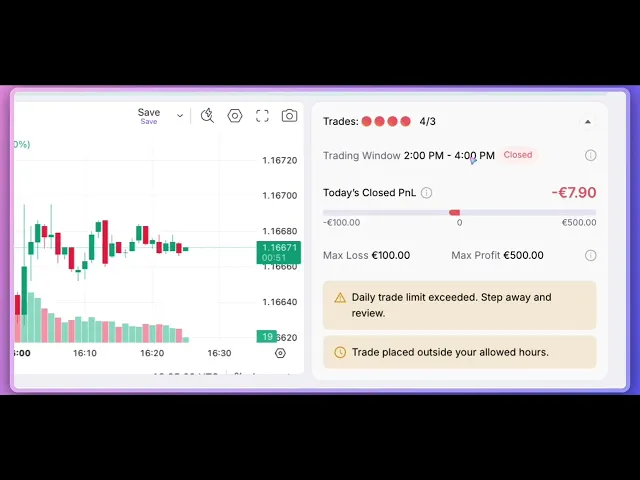
But access to more markets creates a specific kind of risk. Picture this: you blow through your Max Daily Loss trading Forex, and instead of walking away, you open a Gold position to "make it back." That's exactly the moment EdgeFlo's Trade Guard module is designed to stop.
When you hit a hard-limit guardrail — like Max Trades Per Day or Max Daily Loss — the trade button grays out system-wide. Not just on the market where you broke the rule. Everywhere. There's no side door to revenge trade your way out of a losing streak in a different asset class. Your rules protect your entire portfolio, not just the chart you were looking at when things went wrong.
Plan First, Trade Second
Most bad trades don't start at the entry. They start hours earlier, when there's no plan and the trader is improvising in real time as volatility hits.
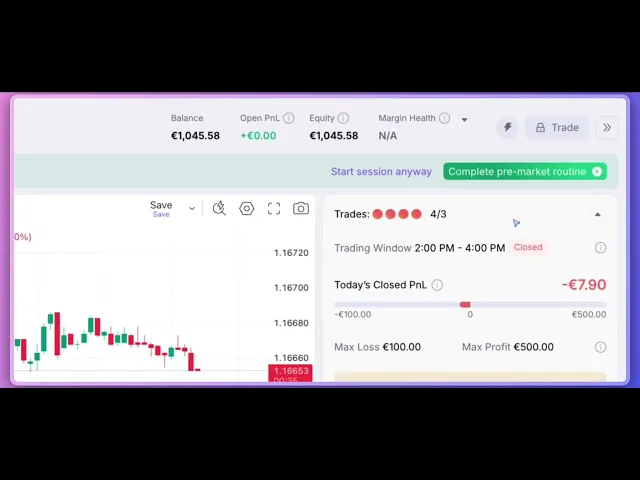
EdgeFlo's answer is the Edge module — a dedicated trade plan builder where you define your higher-time-frame process, your specific entry criteria, and your exit rules before the session even starts. This isn't a journal entry you write after the fact. It's the plan you're required to build before you're allowed to trade.
EdgeFlo enforces the routine instead of offering it. A customizable pre-market checklist banner appears at a set time before your session starts, and it can be configured to block trading entirely until you've reviewed your plan and analyzed the market. Once your plan is set to "Active," it appears in a live sidebar right next to your chart.
The result is simple. You're not trading from memory or from whatever conviction you happen to feel in the moment. You're trading from your own rules, written down, visible, in front of you.
Execute Mechanically, Not Emotionally
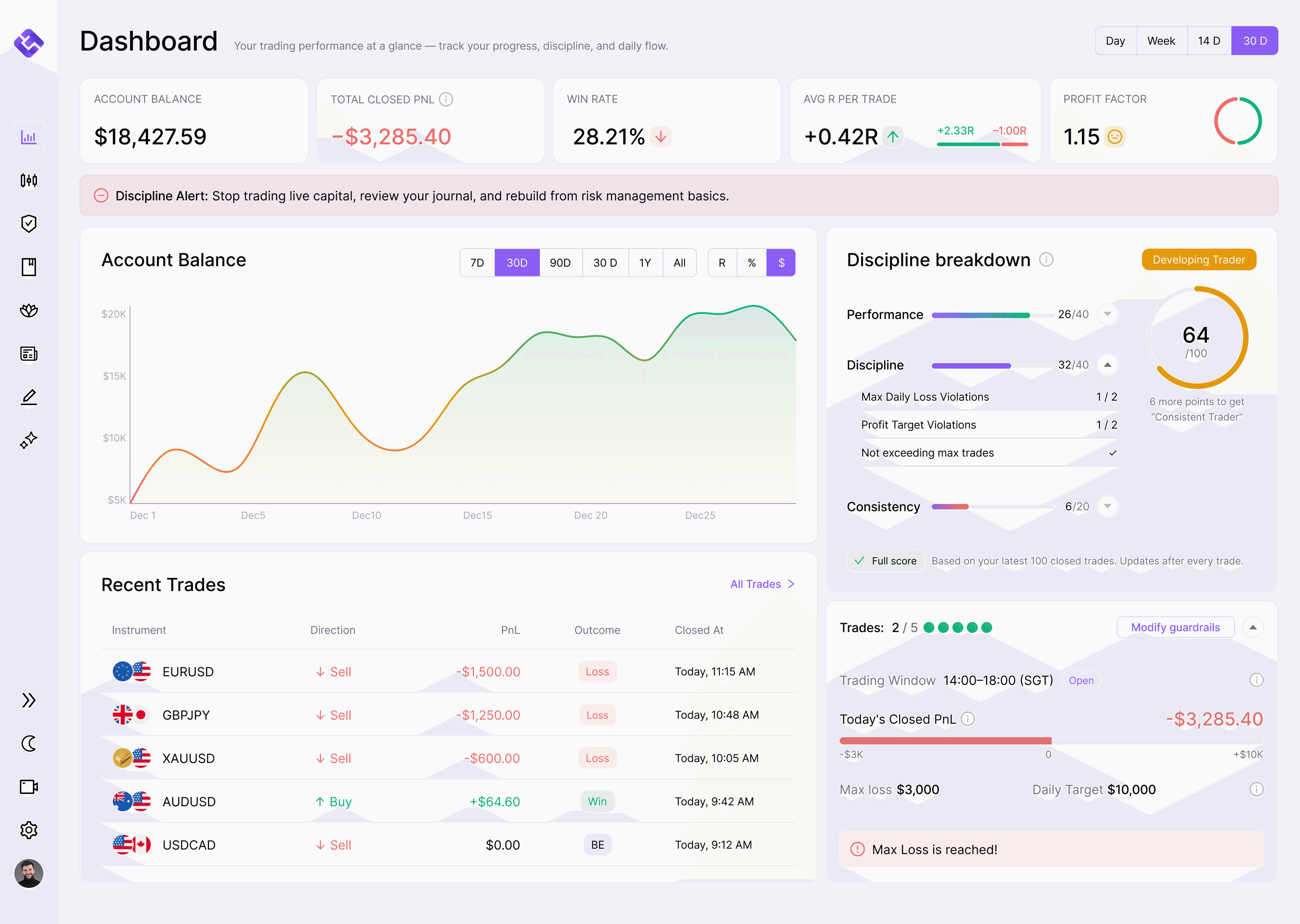
This is where EdgeFlo's Trade Guard does its heaviest lifting. Once you preset your rules — whether that's Max Trades Per Day or Max Daily Loss — the trade button becomes unclickable the moment you hit them.
That distinction matters. This isn't a warning popup you can click through in two seconds and forget. It's a hard wall between you and the impulse to take one more trade you already told yourself you wouldn't take.
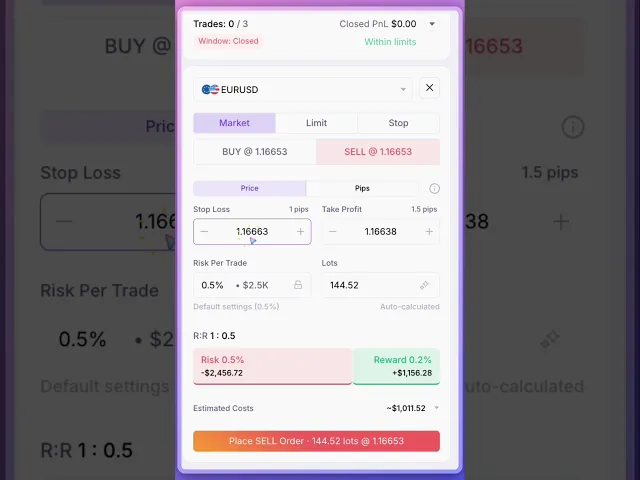
Two more layers work alongside it. The Auto Risk Calculator sizes every trade mechanically: you enter your stop-loss, and EdgeFlo calculates the correct lot size based on your account balance and a fixed risk percentage, like 1%. No more eyeballing position size or overleveraging because the math felt right in the heat of the moment.
For Plus users, News Trade Blocking automatically locks the trade button 15 minutes before and after high-impact news releases, so you're not trapped in unpredictable volatility you didn't plan for.
Review Every Trade Through Auto-Journaling
Reviewing your own data is often called the holy grail of trading progress, and for good reason. It's also the step most traders skip, because manual logging is tedious and easy to abandon after a bad week.
EdgeFlo removes the friction. Every closed position auto-imports in real-time from your connected broker (TradeLocker or cTrader), pulling in PnL, lot size, duration, and session data automatically. There's no manual entry standing between you and an honest record of what actually happened.
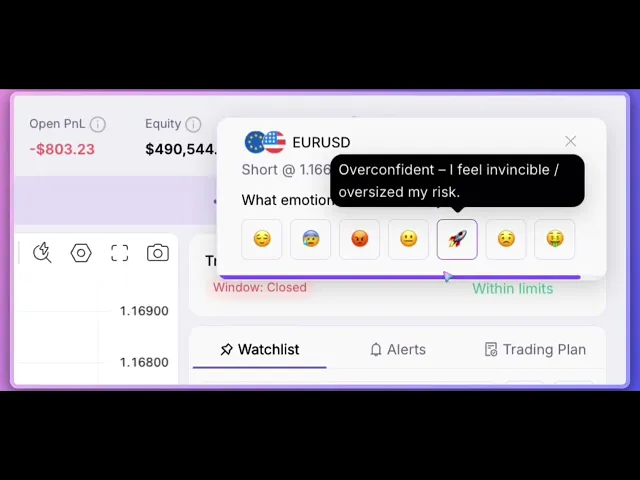
It also captures the part most journals miss entirely: how you felt. EdgeFlo prompts you to tag your entry and exit emotions the moment a trade opens or closes, while the feeling is still fresh, and supports voice-to-text journaling so you can reflect hands-free.
For Plus users, AI Performance Reports take it a step further. Each week, the AI analyzes your trades to surface what worked, flag recurring emotional patterns like revenge trading, and hand you one specific focus for the week ahead. Data and psychology, reviewed together instead of separately.
Connecting Your TradeLocker Account
Getting your TradeLocker account synced with EdgeFlo takes less than a minute, and none of the discipline features above work until this step is done.
Start in Settings > Integrations, then click Connect Existing Account. Use the search bar to find your broker or prop firm by name, select it, and choose TradeLocker as your connection platform.
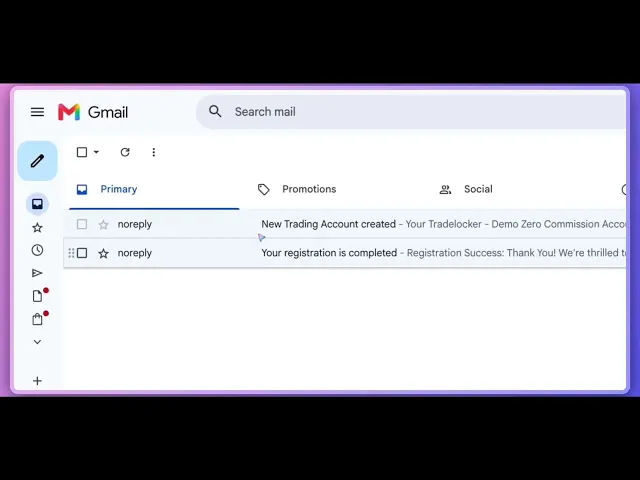
You'll need three credentials: your TradeLocker email, password, and server name. One thing trips people up here: your login is your email address, not a numerical account ID. If what you're looking at is a string of numbers, that's your account ID, not your login.
To find the right credentials, check your inbox for the account creation email from your broker — most send login details this way. If yours didn't, log into your broker's portal directly and look for the login, password, and server name there.
Back in EdgeFlo, enter each credential exactly as it appears, then hit Connect. Your broker is now linked. Sync can take up to two minutes, and you'll see a sync indicator in the top-left corner of the app while it runs. Once that clears, your trades start flowing in automatically and you're ready to trade with the discipline layer turned on.
Bringing It All Together
Plan, execute, review, refine. That's the loop EdgeFlo builds around your TradeLocker account. Each piece reinforces the next: the plan you build pre-market becomes the reference you trade from, the guardrails protect the plan from your worst impulses in the moment, and the auto-journal turns every session into data you can actually learn from instead of a blur you half-remember by Friday.
None of this replaces your edge. It protects it.
One edge. One plan. One system that stops you from being your own worst trade.
Try EdgeFlo
If you're already trading on TradeLocker, connecting your account takes a few minutes. Start your 7-day trial and see what trading with the discipline layer turned on feels like.
The Edge Brief
Receive Insights on trading psychology, discipline, and the behavioral patterns that create consistent traders from our Founder and the EdgeFlo team, delivered to your inbox.
Think different. Trade different.
Turn discipline on.
Every session.
EdgeFlo is the environment serious traders operate inside.
Start 7-Day Free Trial
Cancel anytime.
No long-term commitment.

Think Different, Trade Different.