

EdgeFlo is moving away from MetaTrader & towards TradeLocker and cTrader.
EdgeFlo is moving away from MetaTrader toward TradeLocker and cTrader - platforms that sync trades in real time with no delays. Here is what is changing, why it is happening, and how to make the switch.

EdgeFlo is moving on from MetaTrader
EdgeFlo is shifting away from MetaTrader and moving fully toward TradeLocker and cTrader. Existing MetaTrader connections continue to work as normal for now, but EdgeFlo is no longer investing in MetaTrader support and is encouraging users to switch over the next few weeks.
This is not an emergency. Think of it as a heads up with enough time to make a calm, considered move.
Why EdgeFlo is making this move
MetaTrader is one of the most established trading platforms in the world - but it was built in a closed way. It was never designed to share data with external tools like EdgeFlo.
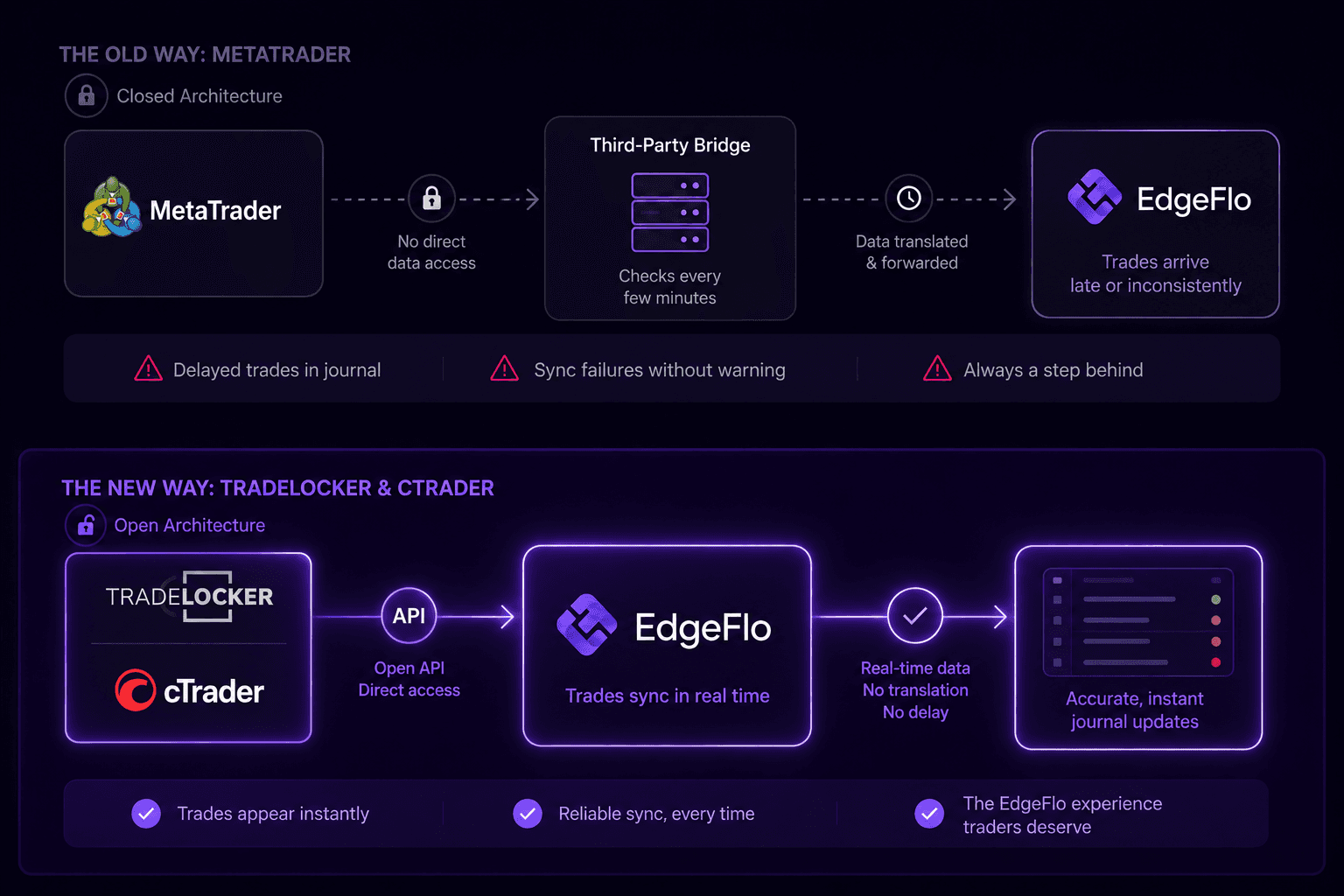
To connect a MetaTrader account, EdgeFlo had to route trade data through a third-party bridge service. That bridge would check the MetaTrader account every few minutes, translate the data, and pass it along to EdgeFlo. The result: trades showing up late in the journal, syncs occasionally failing without warning, and a general feeling that things were just a bit behind.
That is not the EdgeFlo experience traders deserve. TradeLocker and cTrader both have open APIs -EdgeFlo connects to them directly, and trades sync in real time. No bridge, no delay, no guesswork.
Which platform to move to
Traders in the United States
TradeLocker is the right choice. cTrader is not available to US retail traders - this is a restriction set by Spotware, cTrader's developer, and applies across every broker that uses their platform. It has nothing to do with EdgeFlo.
TradeLocker is a modern, web-based trading platform. It connects directly to EdgeFlo, trades sync instantly, and EdgeFlo currently supports eleven brokers through TradeLocker Hub - most accepting US traders, with free demo accounts.
Traders outside the United States
TradeLocker or cTrader - both work great. If a trader's existing broker supports cTrader, that may be the fastest path since an account might already be in place. For those starting fresh, TradeLocker is straightforward to set up and gets traders connected quickly.
Not sure which one to pick? Use this simple guide.
Choose TradeLocker if:
You are based in the United States (cTrader is not available to US retail traders)
You want to start fresh with a new broker
You want to be up and running the same day with a free demo account
Choose cTrader if:
You are outside the United States
Your existing broker already supports cTrader
You prefer to stay with your current broker
To find a cTrader-supported broker, visit ctrader.com/brokers and check availability in your region.
TradeLocker: supported brokers
Follow the setup guide to get connected.
Broker | Setup Guide | Support for US Traders |
|---|---|---|
GatesFX | Yes | |
HeroFX | Yes | |
RisenFX | Yes | |
RestroFX | Yes | |
Crucial Markets | Yes | |
Elyon Markets | Yes | |
LivvFX | Yes | |
ClarityFX | Yes | |
Pips Markets | Yes | |
EightCap | Setup guide coming soon | No |
Focus Markets | Setup guide coming soon | No |
Not sure which broker to go with? Contact EdgeFlo support and the team will help based on trading style and needs.
How to make the switch
Pick a broker from the table above and register on their website
Create a demo or live trading account through their portal
In EdgeFlo, go to Settings, then Integrations, then Connect account - search for the broker and select TradeLocker
Enter credentials: email address, TradeLocker password, and the broker's server name
Existing EdgeFlo trade history from MetaTrader stays exactly as it is. Switching platforms does not delete anything.
Need help choosing a broker or getting connected? The EdgeFlo support team is available - reach out here.
The Edge Brief
Receive Insights on trading psychology, discipline, and the behavioral patterns that create consistent traders from our Founder and the EdgeFlo team, delivered to your inbox.
Think different. Trade different.
What platform should I use to connect my broker to EdgeFlo?
Why isn't MetaTrader an option?
Do I need to create a TradeLocker account separately?
Can I start with a demo account before funding a live one?

Turn discipline on.
Every session.
EdgeFlo is the environment serious traders operate inside.
Start 7-Day Free Trial
Cancel anytime.
No long-term commitment.

Think Different, Trade Different.